You have a mature website or a successful online store. Over 70% of your total traffic comes from smartphones and tablets. User behaviour clearly shows that mobile users demand speed, an intuitive interface and uninterrupted access. The natural next step for scaling your brand seems obvious: build a mobile app.
The standard technology answer sounds demotivating: hire iOS and Android developers, invest in cross-platform development, wait for App Store and Google Play approval. The bottom line: a budget of €15,000 to €40,000+, a timeline of 4–9 months and the risk of rejection.
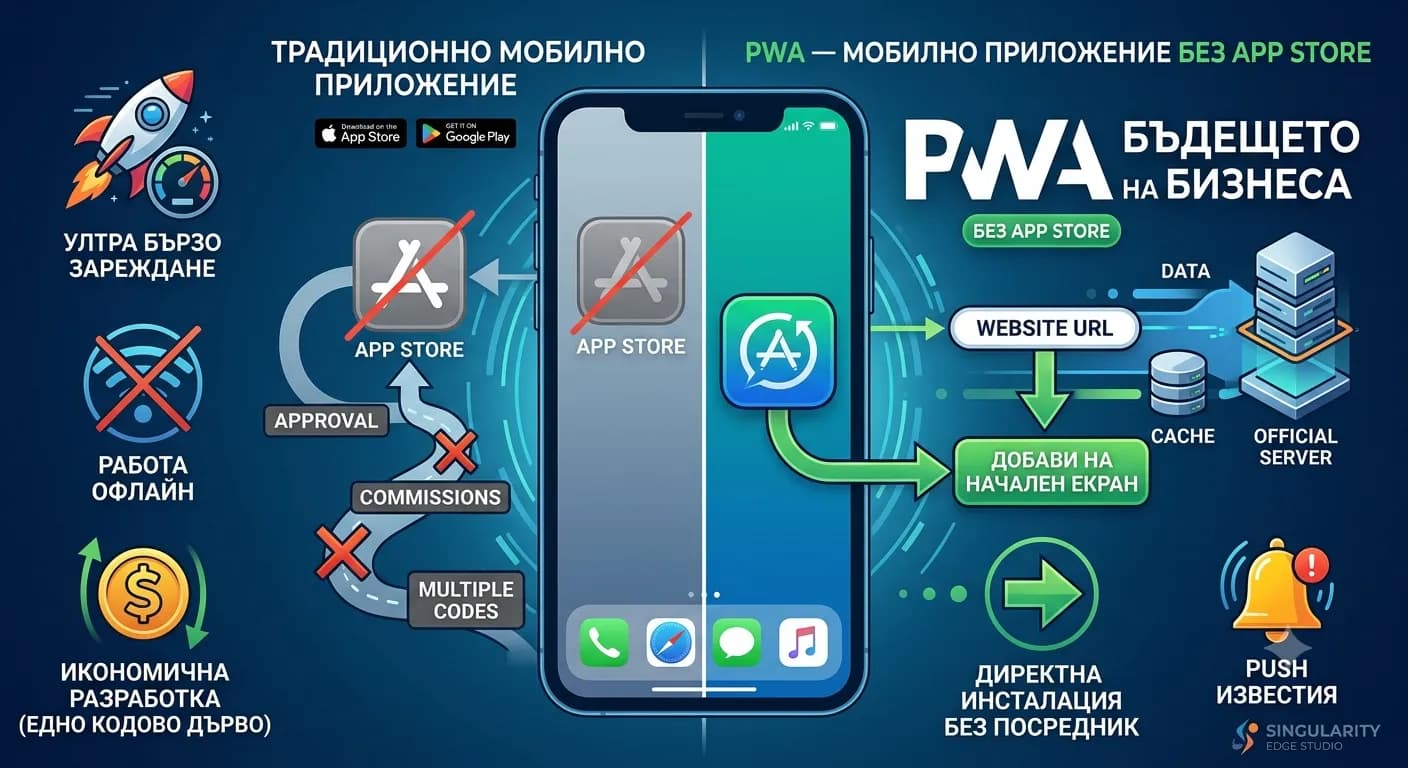
Progressive Web App (PWA) transforms your website into a powerful hybrid app — it installs directly on the phone, works offline, sends push notifications and loads instantly. No App Store, no third-party approval and at a fraction of the cost.
What Is a Progressive Web App (PWA)
At its core, a Progressive Web App (PWA) is a website built with widely adopted web technologies such as HTML5, CSS3 and JavaScript (often powered by modern frameworks like Next.js, React or Vue.js). The difference is that it is enhanced with a set of specific browser capabilities and background scripts. These additional layers allow the site to overcome the limitations of the traditional browser and deliver a user experience that is practically indistinguishable from software downloaded from an official app store. Progressive web apps do not require the user to visit an external platform, enter Apple or Google account passwords or consume hundreds of megabytes of device storage. Installation happens with one click directly from the current browser session.
+-----------------------------------------------------------------+
|                      USER INTERFACE                              |
|          (Next.js / React / HTML5 / CSS UI - App Shell)         |
+-----------------------------------------------------------------+
                                 |
                                 v
+-----------------------------------------------------------------+
|                  SERVICE WORKER (Background mode)                |
|  - Intercepting network requests (Fetch)                          |
|  - Cache management (Cache Storage API)                           |
|  - Handling Web Push Notifications                                |
|  - Background Sync                                                |
+-----------------------------------------------------------------+
        |                                                 |
        v (Has network)                                     v (No network)
+------------------------+                       +------------------------+
|    OFFICIAL SERVER     |                       |      BROWSER CACHE     |
|   (API / Database)     |                       |   (Local resources)    |
+------------------------+                       +------------------------+
The technical architecture of every true PWA rests on three fundamental pillars:
1. Mandatory Secure Connection (HTTPS)
Security is built into the core of PWA. Because the technology allows the website to intercept network requests and manage caching of sensitive data, a valid SSL/TLS certificate is an absolute requirement. Without HTTPS the browser blocks execution of background processes. In the modern web environment, securing a connection is standard and easily achieved through automated platforms such as Let's Encrypt.
2. Service Worker
If the PWA is the body, the Service Worker is its engine. It is an event-driven JavaScript script that the browser runs in the background, completely separate from the main thread of the web page. It does not access the DOM tree directly but acts as a programmable proxy server positioned between the mobile device and the global network. Its core responsibilities include:
- ✓Intercepting every single HTTP request leaving the application.
- ✓Deciding in real time whether a given resource should be fetched from the internet or served instantly from local cache.
- ✓Managing the lifecycle of push notifications, even when the user has closed the application and the browser.
- ✓Supporting background data sync (Background Sync), ensuring user actions are not lost when the signal drops.
3. Web App Manifest
This is a simple but critically important configuration file in JSON format (manifest.json). It provides the mobile operating system with the metadata required for seamless installation of the application on the device. The manifest defines:
- ✓The official name and short name of the application displayed under the icon.
- ✓Links to high-resolution icons for different screen sizes (with mandatory sizes for Android and iOS devices).
- ✓The start URL from which the application launches when opened.
- ✓The display mode — settings such as standalone or fullscreen that instruct the operating system to hide the address bar, browser navigation buttons and system controls, delivering a clean, native look.
- ✓The primary theme color and background color on the splash screen, aligned with your business brand identity.
Detailed Comparison: Standard Website, PWA and Native Mobile App
To understand exactly where PWA sits in the modern digital ecosystem, we need to compare it with traditional web pages and expensive native applications developed separately for iOS and Android.
| Evaluation criterion | Traditional website | Progressive Web App (PWA) | Native app (iOS/Android) |
|---|---|---|---|
| Installation method | Not installed. Requires manually entering a URL in the browser or clicking from a search engine. | Directly from the browser with one click via an "Add to Home Screen" banner. | Exclusively through the Apple App Store or Google Play Store. |
| Offline operation | Completely impossible. Without internet it shows an error message (Offline Dinosaur). | Yes. Full or partial access to features and data through smart caching. | Yes. Full access to the device's local database. |
| Push notifications (marketing) | Not supported on mobile browsers (or heavily limited). | Yes. Full support for Android and iOS (via Safari 16.4+). | Yes. Primary and deeply integrated communication channel. |
| Loading speed | Entirely dependent on internet connection quality and server load. | Instant (Ultra-fast) after the first visit thanks to Service Worker cache. | Instant, as all interface resources are installed locally. |
| Hardware access | Very limited (basic features such as geolocation and camera access). | Broad (Camera, GPS, Microphone, File system, Bluetooth, Sensors). | Full and unrestricted access to all hardware levels and specific APIs. |
| Development cost | Low to medium (depending on platform complexity). | Economical (Medium). Added as a layer on top of the existing website. | Extremely high. Requires separate teams, languages and maintenance. |
| Maintenance and codebase | One codebase. Changes are reflected immediately for all users. | One codebase. Easy maintenance. Updates are transparent and instant. | At least two separate codebases. Every change requires compilation and upload. |
| Update procedure | Automatic and instant at server level. | Automatic in the background. The user always runs the latest version. | Slow. Requires Apple/Google review and manual update by the user. |
| Approval process | None. Full independence and control over content. | None. The product goes live immediately, bypassing censorship. | Strict control. Risk of rejection or removal when marketplace rules change. |
| SEO discoverability | Excellent. Fully indexed by Googlebot and other search engines. | Superior. Combines the best of SEO and app accessibility. | Zero for web search engines. Relies entirely on ASO (App Store Optimization). |
Progressive web apps fill the gap between web and native software. They deliver roughly 85% of native app functional capacity while saving over 80% of development budget and time, removing barriers for end customers.
Who Already Uses PWA: Global Examples and Real Business Results
The technology behind PWA is not a theoretical concept or an experimental tool for small projects. The world's largest digital conglomerates restructured their mobile strategy around PWA, achieving serious business results.
Twitter (X) — The Twitter Lite Project
Seeking to reduce mobile data consumption and improve engagement in regions with slow internet, Twitter developed Twitter Lite as a Progressive Web App.
- ✓Results: The company reported a 65% increase in pages per session, 75% growth in total tweets sent and a dramatic reduction in bounce rate of over 20%.
- ✓Technology triumph: The PWA application size is just over 600 KB, negligible compared to the heavy native Android app requiring over 23 MB on initial download.
Starbucks — Digital Orders Without Limits
Starbucks built a PWA ordering system designed to serve customers even in locations with extremely poor or completely absent network coverage (for example underground levels, malls or remote areas).
- ✓Results: Their PWA allows users to browse the full menu, customise drinks and add products to the cart while fully offline. The moment the device detects a stable signal, the order is sent automatically to the selected location. After launching the PWA, Starbucks doubled daily active users, with mobile orders from desktop and web matching those from the native app.
Uber — Accessibility at Any Speed
To expand into emerging markets where 2G and 3G networks are still the norm, Uber rebuilt their web interface as a lightweight PWA. The application is optimised to load fully within 3 seconds on a low-speed 2G connection. This allowed the company to attract millions of users with older smartphone models that lack free storage for installing heavy native software.
Alibaba — Maximising International B2B Traffic
As one of the world's largest B2B e-commerce portals, Alibaba moved to PWA architecture to improve the experience for users who refused to download the official app. This strategic move led to a 76% increase in overall conversion rate on iOS platforms, 14% more monthly active users on Android and over 4x higher engagement through adding the icon to the desktop screen.
Pinterest — A Leap in Ad Revenue
Pinterest's previous mobile web experience was slow and unintuitive, converting barely 1% of visitors into registered users. Investment in PWA transformed their metrics: time spent on site jumped 60%, user engagement grew dramatically and ad revenue rose 44%, as interface speed enabled more effective display of sponsored content.
When PWA Is the Right Choice for Your Business
Despite its enormous advantages, a Progressive Web App should be chosen based on objective business analysis. Here are the situations where choosing PWA delivers maximum return on investment (ROI):
Online Stores and E-commerce Platforms
If Google Analytics data shows that over 60% of your purchases or traffic start from mobile phones, PWA is an essential tool. Offline mode integration allows customers to browse products, save items to "Favourites" and complete orders even during moments of poor coverage. Push notifications let you bypass overcrowded email spam folders and remind users directly on screen about abandoned carts, new collections or flash sales with exceptionally high Click-Through Rate (CTR).
Digital Media, Blogs and News Portals
For content publishers, offline reading is a key advantage. The user can load the homepage while connected to home Wi-Fi, then read long analyses, news and articles while travelling on the metro or on a plane without consuming mobile data. PWA page-flip speed improves media Core Web Vitals, leading to higher ranking in Google Discover and Google News.
B2B Systems, CRM Platforms and Field Software
If you manage a team of sales representatives, service technicians, quality inspectors or delivery drivers working in the field, they often face lack of signal in industrial zones, warehouses or underground facilities. PWA allows your employees to enter data, fill in reports and sign handover protocols entirely offline. The system automatically syncs changes with the central database as soon as the device connects to the internet.
Local Business: Restaurants, Beauty Salons and Venues
Downloading a native app for table reservation or menu browsing is a barrier that 95% of customers will not overcome. PWA removes that friction. The customer scans a QR code at the table, the site loads in fractions of a second, offers installation as a phone icon and provides access to a digital menu, orders and loyalty bonus points accumulation.
When a Native Mobile App Is Still the Better Choice
As realists and software professionals, we must clearly outline the technical boundaries of PWA. There are specific business niches where building a pure native application (or complex cross-platform software) remains the only alternative.
- ✓Deep hardware integration and peripherals: If your product requires continuous, low-level access to Bluetooth Low Energy (BLE) for connection with medical smart devices, smartwatches or specific hardware; if the software relies on complex Augmented Reality (AR) technologies through tools such as Apple ARKit or Google ARCore, browser capabilities are still insufficient.
- ✓Complex 3D games and heavy graphics processing: Progressive web apps run within the browser engine context. For text, business and transactional interfaces this is perfect, but for mobile games with high-polygon 3D graphics requiring direct GPU access through native Vulkan or Metal APIs, native code has no alternative.
- ✓Focus entirely on the App Store marketing channel: If your business model relies primarily on organic user acquisition directly through searches within the Apple App Store or Google Play Store, a native app provides that presence by default.
- ✓Fintech systems and top-tier banking applications: For platforms requiring hardware-level encryption through built-in secure chips on phones (Secure Enclave) for biometric authentication, or performing contactless payments through direct NFC chip access without Apple Pay/Google Pay web interface intermediation.
Deep Technical Review of PWA Components
For a web application to function as a PWA, it must implement specific APIs and programming patterns. Let us examine how these components interact beneath the surface.
Anatomy of the Service Worker Script
The Service Worker is a fully asynchronous software layer. It cannot use synchronous tools such as localStorage — instead it relies on the more modern and scalable IndexedDB API and Cache Storage API. Its lifecycle passes through three phases: Registration, Installation and Activation.
// Example Service Worker registration in the site's main JavaScript file
if ('serviceWorker' in navigator) {
  window.addEventListener('load', () => {
    navigator.serviceWorker.register('/service-worker.js')
      .then(reg => console.log('Service Worker registered successfully for scope: ', reg.scope))
      .catch(err => console.error('Service Worker registration failed: ', err));
  });
}
Once registered, in the service-worker.js file itself we can define complex resource caching strategies. Here are the three most popular strategies supported by Google's Workbox library:
- ✓Cache First: The application looks for the resource (for example an icon, CSS style or image) in local cache first. If found, it serves it immediately without loading the network. If missing, it requests from the server, displays it and stores it in cache for next time. Ideal for static resources.
- ✓Network First: The application always attempts to fetch the latest data from the internet (for example current product prices or news). If the user is in a tunnel or has no coverage, the Service Worker automatically intercepts the error and serves the last successfully loaded version from cache. Perfect for dynamic content.
- ✓Stale-While-Revalidate: The most balanced PWA strategy. The application instantly serves the cached (potentially stale) version to the user so there is no interface delay, while simultaneously firing a background network request to fetch new data and quietly update the cache for the next opening.
Web App Manifest Structure (manifest.json)
Here is what a fully SEO- and installation-optimised manifest file looks like for a modern web studio:
{
  "short_name": "Singularity",
  "name": "Singularity Edge Studio App",
  "icons": [
    {
      "src": "/icons/icon-192x192.png",
      "type": "image/png",
      "sizes": "192x192"
    },
    {
      "src": "/icons/icon-512x512.png",
      "type": "image/png",
      "sizes": "512x512",
      "purpose": "any maskable"
    }
  ],
  "start_url": "/?utm_source=pwa",
  "background_color": "#0f172a",
  "theme_color": "#2563eb",
  "display": "standalone",
  "orientation": "portrait"
}
Note the addition of the ?utm_source=pwa parameter to start_url. This allows you to easily filter and track in Google Analytics 4 (GA4) exactly how many conversions and sessions come from users who installed the web app on their screens.
The Current State of PWA in Apple's iOS Ecosystem
In the past, Apple deliberately slowed PWA feature integration in iOS to protect its closed App Store economic ecosystem, which generates billions in revenue through a 30% commission on in-app purchases. That digital barrier, however, has been permanently removed. Thanks to regulatory pressure from the European Union (Digital Markets Act - DMA) and large-scale technology updates in the WebKit engine, the current situation is as follows:
- ✓Full Web Push support: Starting from version iOS 16.4 (March 2023), Apple added full support for Web Push notifications for PWA applications that the user has added to their home screen. Notifications are managed through the standard Apple Push Notification service (APNs) and appear on screen exactly the same way as notifications from Messenger, Instagram or your banking app. They support notification badges on the icon and integrate with system phone modes (Focus modes).
- ✓Integration with external browsers: With iOS releases in 2024–2026, iPhone users within the EU can now install PWA applications not only through Safari but also through alternative browsers with independent engines such as Google Chrome and Mozilla Firefox.
- ✓Identical behaviour to Android: Today over 92% of active iPhone devices on the market run iOS versions that support Service Workers, autonomous cache management and installation manifests. Differences in user experience between Android and iOS for standard business applications have been completely erased.
Architectural Symbiosis: PWA Development with Next.js
When building scalable, high-performance web applications with perfect SEO, combining Next.js with PWA capabilities is the most modern market standard. Next.js natively provides Server-Side Rendering (SSR) and Static Site Generation (SSG), ensuring search engine bots receive clean, fully rendered HTML code, while the PWA layer handles client experience and speed after the first click. Previously the next-pwa package was used for integration, but in the modern JavaScript stack for Next.js 14 and 15 (using App Router), the leading and most actively maintained tool is Serwist (successor to Workbox and the next evolution of PWA packages). Here is how a modern PWA application is configured in the Next.js project configuration file:
// next.config.mjs
import withSerwistInit from "@serwist/next";
const withSerwist = withSerwistInit({ // Define where the automatically generated service worker file will live swSrc: "app/sw.ts", swDest: "public/sw.js", reloadOnOnline: true, });
const nextConfig = { reactStrictMode: true, // Standard Next.js project settings go here };
export default withSerwist(nextConfig);
Combined with a Headless CMS architecture (where content is managed by a separate specialised system and Next.js is responsible only for lightning-fast interface rendering), adding a PWA module turns your site into a sales machine that competitors cannot touch. The entire site structure is stored in phone memory, and dynamic product catalogues are quietly updated in the background through API requests.
Financial Analysis: PWA Investment vs Native Development
Let us look at real figures and costs for a medium-sized business that needs a strong mobile presence to optimise operations or sales.
| Financial and operational metric | Progressive Web App (PWA) | Native apps (Two separate applications) |
|---|---|---|
| Initial development cost | €1,500 – €6,000 (Added as a module on top of existing web code) | €15,000 – €50,000+ (Paid for separate design, architecture and two developers) |
| Monthly / annual maintenance costs | Minimal. Every change on the site automatically updates the web app. | High. Requires continuous monitoring for new iOS/Android versions and bug fixes. |
| Platform fees and licences | €0 No intermediaries. Your platform, your rules. | Apple Developer: $99/year. Google Play: $25 one-time registration fee. |
| Customer acquisition marketing costs (CAC) | Extremely low. The user installs the site directly from a Facebook ad or Google. | Very high. Requires a serious budget to get someone into the Store and download the app. |
| Time-to-market | 1 – 3 weeks. | 4 – 9 months. |
PWA is the economical tool for startups that want to quickly test a market niche (MVP), as well as for established brands that refuse to pay huge monthly sums maintaining software that can be replaced by intelligent web technologies.
Complete PWA Implementation Guide: Step by Step
If you make the strategic decision to turn your digital asset into a Progressive Web App, the process passes through five main technical phases.
+-------------------+      +-------------------------+      +-----------------------+
|  STEP 1: AUDIT    | ---> | STEP 2: CONFIGURATION | ---> |  STEP 3: DEPLOYMENT   |
|  Google Lighthouse|      |  manifest.json & Icons  |      |   Service Worker R&D  |
+-------------------+      +-------------------------+      +-----------------------+
                                                                        |
                                                                        v
+-------------------+      +-------------------------+      +-----------------------+
| STEP 5: TESTING   | <--- |  STEP 4: MARKETING    | <--- |   PUSH NOTIFICATIONS  |
|  Real Devices     |      | Custom Install Prompt   |      |  VAPID Keys & API     |
+-------------------+      +-------------------------+      +-----------------------+
Step 1: Full Technical Site Audit
Before starting configuration, your website must be prepared. Run the Google Lighthouse tool through Chrome DevTools, select the "Lighthouse" section and check the "Progressive Web App" checkbox. The tool will run an automatic simulation test and verify:
- ✓Whether the site has a valid and correctly configured <meta name="viewport"> tag for mobile screen rendering.
- ✓Whether initial loading speed meets fast web experience requirements.
- ✓Whether all pages redirect correctly to the secure HTTPS protocol.
Step 2: Design and Generation of Icons and Manifest
Create the basic structure of the manifest.json file. Prepare your application brand icons. For PWA to install seamlessly, you need at least two icon sizes in PNG format: 192x192 pixels and 512x512 pixels. Be sure to configure the 512-pixel icon to support the "purpose": "any maskable" property. This tells operating systems such as Android that they can crop, round or reshape the icon depending on the user's current phone graphic theme without blurring your logo.
Step 3: Creating the Service Worker and Choosing a Cache Strategy
If you use plain JavaScript, implement Google's Workbox library. Configure it so that key interface elements — main styles (CSS), logo, fonts and navigation structure (the so-called App Shell architecture) — are hard-cached on the first site visit. Set rules for dynamic pages so that when connection is lost the application displays a beautiful, personalised offline page instead of the browser's system error.
Step 4: Web Push Notification Integration
To send messages, you need to set up a connection between your PWA and your backend server. This is done by generating a pair of secure keys called VAPID keys (Voluntary Application Server Identification).
- The user visits your site and receives an elegant, unobtrusive banner asking permission to receive notifications.
- On consent, the browser generates a unique identification token (Subscription Object).
- This token is sent and stored in your database. You can now send targeted messages at any time through Node.js, PHP or Python scripts using Web Push libraries.
Step 5: Testing in Real Conditions
Never rely entirely on simulators in the desktop browser. Deploy the site to a real environment. Take an Android phone and verify whether the operating system automatically shows the built-in installation banner. Take an iPhone, open the site through Safari, press the "Share" button and verify whether the "Add to Home Screen" option works correctly. Enable Airplane Mode on the test device and ensure the application's main pages continue to open at lightning speed.
The Link Between PWA and SEO: Myths and Facts
In digital marketing circles, a serious concern persisted for a long time: "If the software loads content from local cache through the Service Worker, won't that prevent Googlebot from reading my new pages and ruin my site's SEO ranking?" Let us debunk these myths with official facts from Google's engineering documentation:
Fact 1: Googlebot Ignores Service Worker Background Processes
When search engine bots (Googlebot, Bingbot) visit your PWA, they deliberately bypass the installed Service Worker layer. The bot does not cache data on its phone and does not use offline features. It makes a traditional HTTP request directly to your server. Therefore, if your site is built correctly with Server-Side Rendering technologies (Next.js), Google sees perfectly structured and complete HTML code ready for indexing.
Fact 2: Dramatic Improvement in Core Web Vitals Metrics
Google uses algorithms that measure the real user experience on your site (UX), based on speed metrics from real Chrome users (Chrome User Experience Report - CrUX). Because PWA caches the App Shell locally, metrics such as LCP (Largest Contentful Paint) and INP (Interaction to Next Paint) improve dramatically. The site responds to clicks in under 50 milliseconds. For Google this is a clear signal that your platform delivers superior quality, and the algorithm gives you ranking advantage over slower, heavier competitor sites.
Fact 3: Elimination of Duplicate Content
When developing a native mobile app, you are often tempted to create a separate subdomain for mobile users (e.g. m.yoursite.com) or have web pages that duplicate information in the app. With PWA this problem does not exist. You have one single URL for every product page or article. All social shares, backlinks and user traffic accumulate in one place, increasing the overall authority of your primary domain (Domain Authority).
Examples of Architectural PWA Solutions by Industry
To visualise how a Progressive Web App can fit your business development model, let us examine four sample conceptual models:
Scenario A: Modern Restaurant and Food Chain Systems
- ✓The problem: Customers hate waiting for servers during peak hours, and installing native apps for a one-time visit is inefficient.
- ✓The PWA solution: Each table has a unique QR code. Scanning opens the restaurant's PWA application. Thanks to App Shell cache, the menu renders in 0.2 seconds. The customer orders directly through the web interface and pays via integrated Apple Pay or Google Pay buttons. The app offers home screen installation with a promise of 10% discount on the next visit. Subsequently the restaurant sends push notifications every Thursday evening with a promotional weekend menu, maintaining steady occupancy.
Scenario B: Large E-commerce Stores for Fast-Moving Goods
- ✓The problem: Users browse products while commuting to work but lose coverage in certain zones, leading to interrupted sessions and forgotten orders.
- ✓The PWA solution: The online store moves to Next.js + PWA architecture. Product categories are cached using the Stale-While-Revalidate strategy. Even if the user enters a no-coverage zone, they can continue browsing already loaded clothes or goods, add them to the cart and fill in delivery details. When pressing the "Buy" button in offline mode, the Service Worker records the order in the local queue (Background Sync API). As soon as the customer leaves the no-coverage zone, the order is sent quietly to the merchant's admin panel and the user receives a push notification: "Thank you! Your order was accepted successfully!"
Scenario C: News and Specialised Niche Media
- ✓The problem: High user drop-off due to slow loading of heavy ad banners and lack of engagement after reading a single article.
- ✓The PWA solution: The media outlet implements PWA with automatic background download of the Top 10 most-read news stories of the day. Users install the app and get an icon on their phone. Whenever a breaking event occurs, the editor-in-chief sends a push notification. Clicking the notification opens the article instantly, as its text was already downloaded in the background through the Background Fetch API before the user even unlocked their device.
Scenario D: B2B Distribution and Logistics Platforms
- ✓The problem: Delivery drivers enter client underground warehouses where they have no server connection to record that goods were delivered.
- ✓The PWA solution: The logistics company builds an internal PWA for employees. The driver uses the phone camera through the web browser to scan the package barcode in the underground warehouse. The application records validation locally in an IndexedDB database. When the driver surfaces and the phone catches 4G/5G network, the software automatically updates package status in central ERP software without manual action.
Key Metrics for Evaluating Your PWA Success
After software implementation is complete, your marketing team should start tracking specific Key Performance Indicators (KPIs) that prove the economic effectiveness of the PWA solution:
- ✓Install rate: This metric measures what percentage of unique mobile site visitors choose to press the install button for the home screen icon. With proper targeting and a visually appealing custom banner, the realistic rate ranges between 2% and 7%.
- ✓Return visit rate: Data analysis shows that users who have your PWA icon on their phones visit your digital platform 2.5 to 4 times more often compared to regular mobile visitors coming from search engines. The screen icon acts as a permanent free visual reminder of your brand's existence.
- ✓Session duration: Due to the absence of browser navigation bars and the high interface response speed, users spend on average 40% more time browsing content, behaving exactly like users of an expensive native app.
- ✓Push notification CTR (Click-Through Rate): Track how many people open your messages. Unlike email marketing where average CTR is around 1–3%, properly segmented and personalised web push notifications in PWA achieve CTR of 8% to 22%.
- ✓Conversion rate lift: Compare directly the percentage of completed orders or generated leads from users with installed PWA versus standard mobile sessions. The global standard shows an average conversion increase of over 20% after implementing the technology.
Frequently Asked Questions (FAQ) About Progressive Web Apps
Question 1: Can a PWA be published to the Apple App Store and Google Play Store if our business model requires it at a later stage?
Yes, absolutely. Although the core idea of PWA is to bypass app stores, you can "wrap" your existing PWA application in a so-called native container. For Google Play the Trusted Web Activity (TWA) technology is used, and for the Apple App Store you can use modern tools such as PWABuilder (an open-source project supported by Microsoft). This way you get store presence without rewriting a single line of your web code.
Question 2: How much digital data can a PWA store in phone memory?
This depends entirely on the specific browser and operating system, but modern limits are extremely generous. Most modern browsers (Chrome, Edge, Firefox) allow PWA to use up to 50% of available disk space on the device. On iOS and Safari the limit is fixed at around 50 MB for static cache, but for storing text data and product structures through IndexedDB you can use hundreds of megabytes. This is more than enough space for any medium or large online store.
Question 3: How does the application update when I make a change to my site?
Updating is fully automated and transparent for the end customer. When you change site code or upload a new product to the server, on the next PWA application opening the Service Worker detects that a newer version of the service-worker.js file exists on the server. It downloads it quietly in the background. On the user's next application launch, the new version activates automatically. There is no annoying wait for downloading updates from the App Store.
Question 4: Do PWA applications work on desktop computers and laptops?
Yes, they work perfectly. PWA is a cross-platform technology. Users on Windows, macOS and Linux can install your application directly from the browser on their computers. It will get its own desktop icon and open in a standalone window without the browser address bar, which is extremely useful for B2B software and SaaS (Software-as-a-Service) platforms.
Question 5: Are there restrictions on access to the user's contacts and phone directory?
Currently access is provided through the Contact Picker API. This feature works seamlessly on Android devices through Chrome. On iOS devices access is more restrictive due to Apple's specific personal data privacy policies, but web standards are continuously evolving toward full integration.
// SINGULARITY EDGE STUDIO
PWA implementations built for results
Expert Next.js development, Headless CMS architectures and scalable PWA solutions — offline mode, push notifications and instant loading without the App Store.
- PWA module on Next.js1–3 weeks · offline, manifest, push notifications
- Serwist + Workbox cache strategiesCache First, Network First, Stale-While-Revalidate
- WordPress / existing siteCustom Service Worker layer for high traffic loads
Ready for a mobile app without the App Store?
Request a professional PWA consultation and receive a concrete plan for your business.
Request a PWA consultation →Conclusion: The Future of Mobile Business Is Progressive
Investing in a Progressive Web App (PWA) is not a compromise technology solution — it is a mature, strategic choice for businesses that value budget capitalisation, demand speed of market response and want to deliver flawless user experience. In the modern digital world, no user wants to spend time deleting personal photos to free phone storage for installing yet another heavy mobile app.
The real question is whether the path to your customers must necessarily pass through the restrictions, censorship and heavy financial commissions of the App Store. When launching new Next.js-based web projects, implementing PWA modules is no longer an expensive extra but a standard software specification. For existing Next.js platforms, integrating full PWA functionality is a matter of 1 to 2 weeks of precise engineering work.
// TOPICS
Author
Singularity Edge Studio
Engineering studio for web and software — Plovdiv, Bulgaria. We build corporate sites, SaaS, e-commerce, and DevOps infrastructure with a focus on measurable outcomes.
// MORE ARTICLES
Headless CMS — what it is and why your business needs it in 2026
Monolithic WordPress does not scale to mobile apps, kiosks and B2B portals. Headless CMS solves the problem with API-first architecture — create content once, deliver everywhere. Complete guide for 2026.
Web DevelopmentNext.js vs WordPress — when to choose one over the other
An honest 2026 comparison: speed, security, CMS, cost and scalability — when WordPress is right, when Next.js wins, and when a headless combo makes sense.
Web DevelopmentHow much does a website cost in Bulgaria in 2026
Concrete prices for landing pages, corporate websites, online stores and custom software — what drives the budget, hidden costs and how to pick a vendor without surprises.